

The Profit and Loss Statement Excel Template is designed to streamline financial reporting by summarizing revenues, costs, and expenses over a specific period. This template facilitates easy tracking of business profitability and helps identify key areas for cost management. By using this Excel tool, businesses can generate clear, accurate financial statements essential for informed decision-making.
Monthly profit and loss statement Excel template for small business
Enhance your financial tracking with this Monthly Profit and Loss Statement Excel Template, designed specifically for small businesses. It provides clear insights into your income and expenses, helping you monitor profitability efficiently. Easily customizable, this template simplifies your accounting process and supports smarter financial decisions.
Free downloadable profit and loss Excel template for startups
Download this free profit and loss Excel template designed specifically for startups to effortlessly track revenues and expenses. Simplify financial management and make informed decisions with an easy-to-use, customizable format. Ideal for new businesses aiming to optimize profitability from day one.
Annual profit and loss statement Excel template with charts
Analyze your business performance effortlessly with this Annual Profit and Loss Statement Excel Template. It comes complete with dynamic charts that visually represent your financial data, making insights clear and actionable. Streamline your accounting process and make informed decisions with ease.
Restaurant-specific profit and loss statement Excel template
Effortlessly manage your restaurant's finances with this Restaurant-specific profit and loss statement Excel template, designed to track income, expenses, and profitability. Tailored for the hospitality industry, it provides clear insights to optimize your business performance. Simplify your accounting process and make informed financial decisions with this easy-to-use tool.
Simple profit and loss statement Excel template for freelancers
Our profit and loss statement Excel template is designed specifically for freelancers, allowing easy tracking of income and expenses. This simple yet effective tool helps you monitor your financial performance and manage your business with clarity. Download the template to streamline your accounting process today.
Detailed profit and loss statement Excel template with income and expense categories
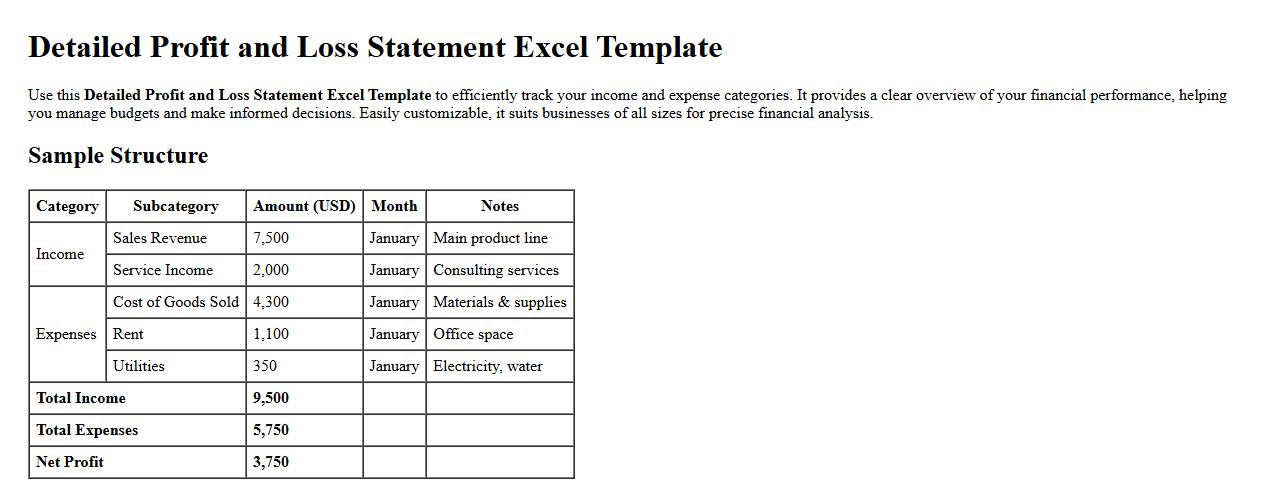
Use this Detailed Profit and Loss Statement Excel Template to efficiently track your income and expense categories. It provides a clear overview of your financial performance, helping you manage budgets and make informed decisions. Easily customizable, it suits businesses of all sizes for precise financial analysis.
Automated profit and loss statement Excel template for e-commerce businesses
Streamline your financial tracking with this automated profit and loss statement Excel template, designed specifically for e-commerce businesses. Easily monitor revenues, expenses, and net profit to make informed decisions. Enhance accuracy and save time with this customizable, user-friendly tool.
Project-based profit and loss statement Excel template download
Download our project-based profit and loss statement Excel template to efficiently track income and expenses for individual projects. This easy-to-use template helps you monitor profitability and manage financial performance with clear, organized data. Enhance your project accounting accuracy and make informed business decisions effortlessly.
Multi-department profit and loss statement Excel template with analysis
The Multi-department profit and loss statement Excel template provides a comprehensive financial overview across various departments, enabling efficient tracking of revenues and expenses. Designed for in-depth analysis, this template helps identify key profit drivers and cost centers to optimize business performance. Its user-friendly layout ensures easy customization and accurate financial reporting for strategic decision-making.
How can I automate monthly data imports into my Profit and Loss Statement Excel template?
To automate monthly data imports, utilize the Power Query feature in Excel which allows seamless data extraction and transformation. Set up queries to connect directly to your data sources such as CSV files, databases, or APIs. Schedule refreshes to update your Profit and Loss Statement automatically without manual intervention.
What Excel formulas best track department-wise profit and loss variances?
Employ the SUMIFS formula to aggregate profit and loss figures by department dynamically. Use IF formulas combined with logical tests to identify variances against budgeted targets. Additionally, VLOOKUP or XLOOKUP can help cross-reference department data for detailed variance analysis.
How do I create dynamic charts for P&L trends in Excel?
Utilize Excel's Pivot Charts connected to Pivot Tables summarizing your P&L data by period and category. Incorporate slicers and timeline filters for interactive data exploration of monthly or quarterly trends. Updating the underlying data automatically refreshes these dynamic charts to reflect the latest financial insights.
What conditional formatting highlights negative profit margins in my P&L spreadsheet?
Apply conditional formatting rules targeting cells with profit margin values less than zero using a formula-based rule. Choose a striking fill color such as red to immediately draw attention to negative profit margins. This visual cue helps quickly identify underperforming categories or departments in the Profit and Loss sheet.
How can I reconcile multiple P&L Excel sheets into a consolidated report?
Use the Consolidate tool in Excel to aggregate multiple P&L sheets by matching categories and accounts. Alternatively, link sheets with SUMIF or INDIRECT functions to pull data dynamically into a master consolidated report. This process ensures accurate aggregation of departmental or subsidiary P&L results in one unified statement.